 Matdrome

Attendance
A gym attendance system that is the roster, not a second list
Check-in happens on the class roster the front desk already has open. No separate register, no cross-checking a booking list against a paper book at the end of the night.
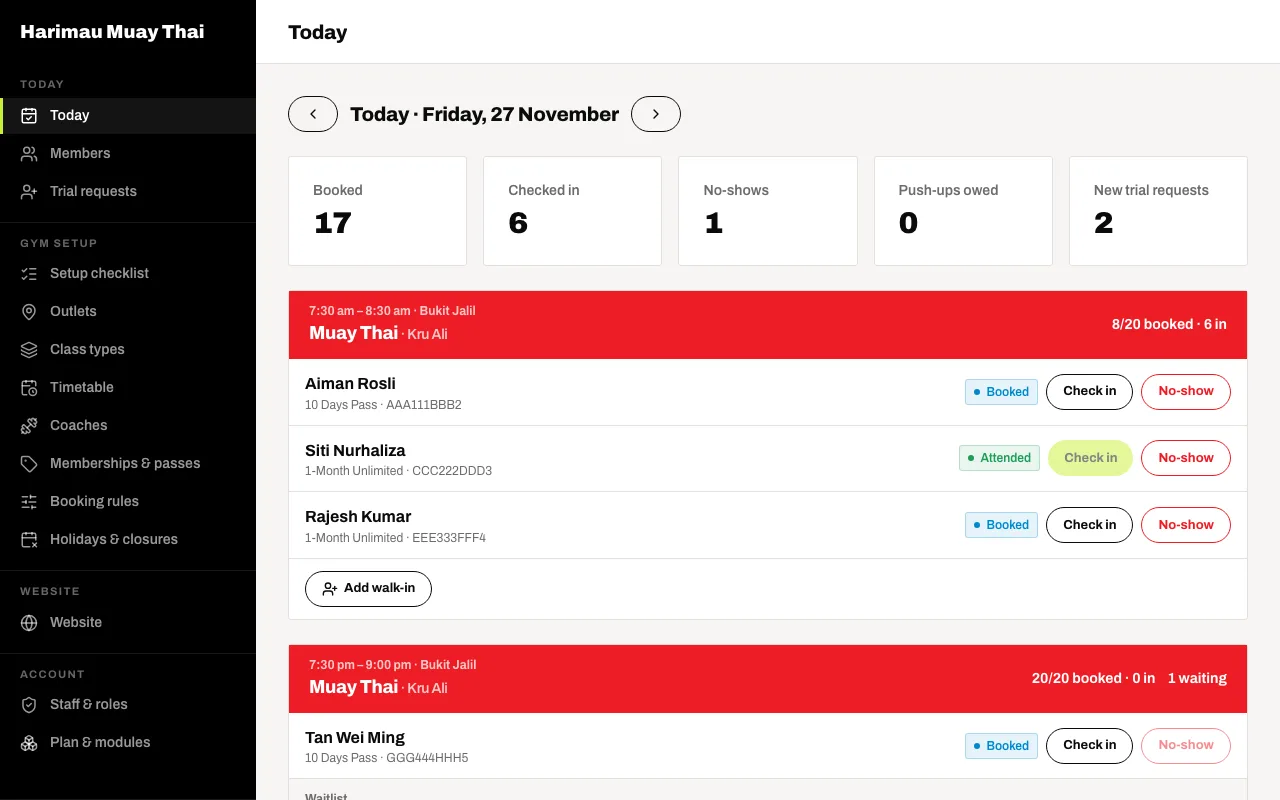
One screen for the day
The roster lists the day's classes with the coach, who is booked, who is on the waitlist and who has arrived. Check in takes one tap; a no-show takes one tap; a walk-in is added to the same class in the same list.
The day's totals sit at the top: booked, attended, no-shows and new trial requests. That is the whole front desk's morning, without a spreadsheet.
- Check in, mark a no-show, add a walk-in, all from the same class
- Waitlist position visible, so the desk can answer 'am I in?'
- The day's counts at the top of the screen
- A coach sees only the classes they teach; staff can be limited to one outlet
Attendance is what makes a membership real
A member who pays every month and never appears is a conversation worth having, and you can only have it if the record exists. Because the booking and the check-in are the same row, attendance is a by-product of running the desk, not an extra job.
A walk-in who is already on the waitlist is converted rather than duplicated, so the count stays honest.
House rules, recorded
The cancellation window is a gym setting, not a conversation at the door: you choose how many hours before class cancelling is free, and the same number applies to every member and every class.
A cancellation inside the window still returns the class credit, so lateness costs a member nothing they paid for. A no-show is the case where the credit is used up, and the day's no-show count is on the roster for whoever needs to follow up.
Closed days and holidays
National public holidays are already in the calendar. For each one you decide whether the gym closes or whether selected classes still run. A closure cancels that day's bookings and returns the credits.
Selangor's state holidays are seeded; for another state, add the dates you close yourself. The roster shows a closed day as closed rather than as a class nobody booked.
What it does not do yet
Check-in here means the front desk marking the roster. It does not mean hardware at the door, and this page will not imply otherwise.
- Door access and turnstiles, or a QR code a member scans at the entrance
- Owner reports that chart attendance over a month or a term
- Member invoices and payments
- Personal training sessions on the roster
- Belt and grade tracking
Plans from RM99 a month. The free trial is 30 days on Studio, no card. Every plan and limit.
Questions gym owners ask
More answers on the full FAQ.
Is there a fingerprint or card reader?
No. Attendance is marked on the roster by staff at the desk, on a phone, tablet or laptop. Door hardware is not offered.
Can staff mark a member who turned up without booking?
Yes. A walk-in is added to the class from the roster, and if that member was already on the waitlist the booking is converted rather than duplicated.
Does a no-show cost the member a class?
You decide the window. A cancellation before that window is free, a cancellation inside it still returns the credit, and a no-show is the case that uses it. The number of hours is a gym setting.
Can I see attendance for last month?
Not as a report yet. The roster for a past date is not the same as a monthly attendance report, which is planned rather than live.
Run the desk from one roster
Start a free trial and run a real training day from today's roster: check in, mark a no-show, add a walk-in.